GDD in one page
GDD, Gate-Driven Development, is a way of building software with AI coding agents in which every change moves forward by passing gates, and risk decides how many gates and how strict. This page gives you the whole method in one sitting: the problem it solves, the idea, the phases and gates, the traffic light, the roles, the words, and two changes side by side.
The problem
Coding agents make work look finished fast. In minutes you get green tests, tidy code and a confident summary. The last part, what makes the work correct for your case, is often missing, because it already looks done.
This is a common experience, not a rare one. In the 2025 Stack Overflow Developer Survey, 66% of developers named "AI solutions that are almost right, but not quite" as their biggest frustration with AI tools.
You also cannot read every line. An agent writes code faster than a person reads it. If you review everything, you become the bottleneck and the agents wait for you. If you review nothing, you ship code that is almost right.
GDD is a third way: let machines check everything that can be checked, and ask you only what needs a person.
The idea
A gate is a checkpoint a change must pass to move on. It answers yes or no, and says why. Most gates are run by machines: the linter, the tests, the scenarios, mutation testing, the security scanners, a second agent that reviews the work. Two gates are yours: approving what the change must do, and accepting the result.
Risk decides the gates. Not every change deserves the same care. A garden shed and a hospital both need a permit, but nobody inspects them the same way. In GDD each path of the project has a risk color in a zone map: green, yellow or red. A change takes the highest color among the paths it touches, and the color decides which gates it meets and how strict they are.
The rules of the method live in GDD.md. gdd is the tool that runs them:
it starts the agents, runs the gates in a fixed order and stops the change when a limit is
reached.
Principles
Principles are the rules the GDD method never bends. They do not depend on the gdd tool, on a
stack or on a model: they would hold with any other tool. Every mechanism on this site exists because of one of them.
The source is GDD.md.
- Nothing moves forward without passing a gate. No one, person or agent, skips a gate or loosens one. Holds up: the phases and gates.
- Risk decides the gates, not size. A change takes the color of the riskiest path it touches; the color decides how many gates it meets and how strict they are. Holds up: the traffic light and the red zones.
- Machines check; people decide. A gate answers yes or no with its reason, never an opinion. You do not read code: you decide what is sensitive, what the product must do and whether the result is good, in as few sittings as possible. Holds up: G0, G2 and G3 run by machines, G1 and G4 by you.
- Behavior is agreed before code. The scenarios you approve are the contract, and whoever builds cannot change them. Holds up: G1, executable Gherkin and hidden examples.
- Whoever builds does not judge their own work. The checks are independent of the builder: gates the agent cannot edit, and a Reviewer of another model family. Holds up: Path Guard and the review.
- Everyone gets the minimum context. Each agent receives only what its task needs. Holds up: the package of each change and the roles.
- Every loop has a limit. What gets stuck stops and asks; nothing iterates forever. Holds up: rounds, the replan and parking a change.
- Done is not good. A change that passes every gate can still be unfinished. You are the
editor at the end, and the project writes its quality bar in
docs/standards.md. Holds up: G4 and polish. - What repeats becomes a rule, and outcomes are measured, not output. A repeated error becomes a rule, a lint, a hook or a test. Delivery metrics and GDD's own signals are measured; tokens measure cost, not productivity. Holds up: Learn and measuring.
Phases and gates
Work goes through six phases. Phase N ends in gate GN, except Learn, which has no gate. Look at the colors: the purple gates are the ones a person opens; the machines open the others.
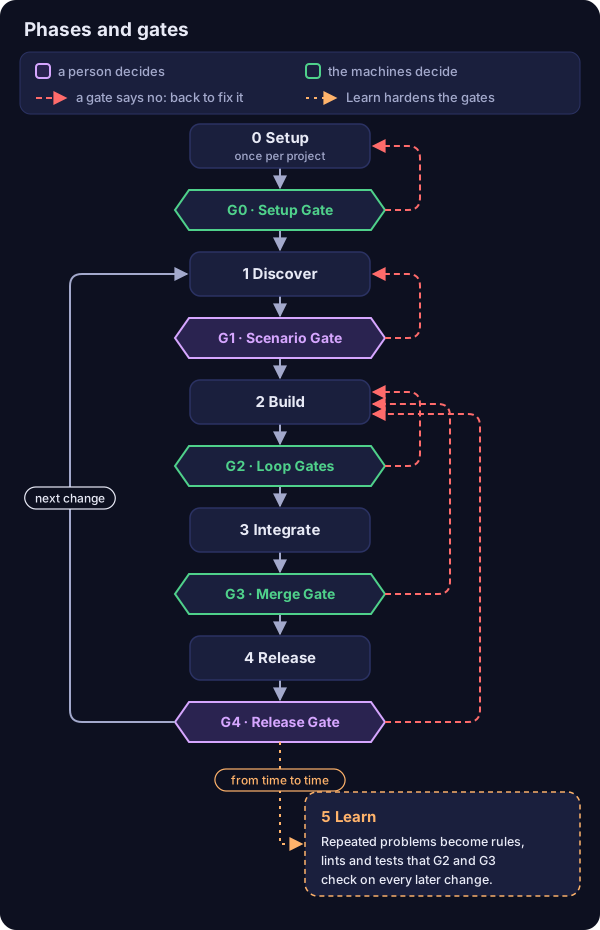
Read it as three kinds of arrow. The gray ones are a change's path: Setup happens once per project, and after G4 the next change starts again at Discover. The red ones are a gate saying no: the change goes back to the phase that can fix it. G1 KO sends the scenarios back to Discover; a red G2 gives the Builder another round, and after a few rounds the Orchestrator replans once; a red G3 or a Reviewer KO gets one fix; polish at G4 is one more pass of the Builder with your notes. When a change still does not pass after those tries, it does not loop forever: it parks and waits for you in its Decision Inbox. The dotted one is Learn, which is not a step of each change: from time to time you look at what keeps coming back, polish notes and Reviewer findings, and turn it into rules, lints and tests, so the gates of every later change catch it on their own.
| Phase | What happens | Its gate | Who opens it |
|---|---|---|---|
| 0 Setup | Once per project: what it is, platform, technology, what would be serious if it failed. Out come the Project Brief, the harness and its self-test. | G0 Setup Gate | The machines, once the Brief exists and the self-test passes 4 of 4 |
| 1 Discover | Research, options, spikes, the MVP and its kill rule, the next changes. At the end, the sensitive areas become red zones. | G1 Scenario Gate | You, when a change creates or changes scenarios |
| 2 Build | The Builder writes the scenario steps (test mode), then the code (build mode), round after round. | G2 Loop Gates | The machines: linter, types, tests, Path Guard, architecture rules, on every round |
| 3 Integrate | The full automatic chain, then a Reviewer of another model family. If it passes, it merges and deploys to pre only. | G3 Merge Gate | The machines |
| 4 Release | Tests and a demo in pre. The same artifact is promoted to production. | G4 Release Gate | You, when there was a G1 or the change is red; otherwise the machines |
| 5 Learn | Repeated problems become rules, lints, tests and lines of docs/standards.md. |
None |
A mnemonic from GDD.md: the machines open 0; the human opens 1
and sometimes 4; the machines guard 2 and 3.
The life of a change follows one change through every step of Build,
Integrate and Release, in the order gdd runs them.
The traffic light
The color of a change is its Gate Level. There are only three colors, and the highest one among the paths a change touches wins. Read the diagram from the top: what you get grows with the color.
flowchart TD
    P["Paths the change touches"] --> Z["Zone map gives each path a color"]
    Z --> H["The highest color wins"]
    H --> GR["Green: cheap Builder, no mutation testing, Fast Lane possible"]
    H --> YE["Yellow: tests first, Reviewer always"]
    H --> RE["Red: you approve the plan, strong Builder, mutation testing, deep review, G4 always"]
    classDef green fill:#d9f2e3,stroke:#2e8b57,color:#123
    classDef yellow fill:#fff4cc,stroke:#c9a400,color:#321
    classDef red fill:#fbdcdc,stroke:#c0392b,color:#311
    class GR green
    class YE yellow
class RE red- Green: a cheap or local Builder, no mutation testing, and the Fast Lane is possible.
- Yellow: characterization tests before touching existing code, and the Reviewer always. Mutation testing on the diff when the project turns it on for yellow. Code that no zone names is yellow by default: code without known tests.
- Red: you approve the plan (not the code), a more capable Builder, mutation testing on the diff, a deep review that also looks at security, and G4 always. Never the Fast Lane.
Color beats work type and lane. A one-line Hotfix in a red zone is red. When in doubt, the higher color. How risk picks the gates explains each rule and why.
Lanes
A change travels one of two lanes.
- Fast Lane: G2 and G3, no human stop. Only when all three hold: the change is not red, it creates or changes no scenario, and it passes the resumption test (another agent could pick it up with the ticket alone). The Orchestrator judges the last one, and it is logged.
- Full Lane: everything else, as the rules table says.
Roles
| Role | Who | What it does | What it never does |
|---|---|---|---|
| Human | You | Answers the Setup, takes part in Discover, approves scenarios, red zones and red plans in one sitting, answers G4 when it applies | Reads code to approve it |
| Orchestrator | A strong model | Holds the map: architecture, zones, scenarios, state. Splits work into changes, writes each change's small context package, replans a stuck change once, groups what needs you | Writes code, resolves merge conflicts, loosens gates |
| Builder | Cheap or local in green, more capable in red | Two modes, in separate sessions by default: test mode writes the steps of the scenarios with real assertions; build mode writes the code and its unit tests until G2 is green | Edits approved tests or protected files, silences warnings |
| Reviewer | A model of another family than the Builder | Reads the whole change and the gate results; says OK or KO with reasons; checks every step does what its scenario says | Changes a file, opens new rounds |
| Machines | The gates | Say yes or no, and why | Judge what a command cannot check |
Roles lists what each role reads, writes and may run.
Words you will meet
- A change is one small piece of value that goes through the gates as a unit, on its own
branch
change/<id>. It may cover one scenario, several, or none. - A scenario is a Gherkin sentence (
Given... When... Then...) that says what must happen. The scenarios are the contract you approve at G1. - A red zone is a path where a mistake would be serious. A sitting is the one moment you approve everything a change needs from you.
- The Decision Inbox is the single message a change leaves you: what needs you, what was decided without you, what was parked.
- To park a change is to stop it with a message for you. Polish is your third answer at G4: one more Builder round with your notes.
The glossary has every term, each linked to the page that owns it.
Two changes side by side
Take shop, a small web shop. Its zone map says that the words on the screen are green and the
login code is red; everything else is yellow by default:
default = "yellow"   # code without a zone = code without known tests

[[zone]]
color = "red"
paths = ["src/shop/auth/**"]
reason = "Logins and sessions: a hole here exposes accounts"

[[zone]]
color = "green"
paths = ["web/copy/**"]
reason = "Words on the screen"
Two changes arrive on the same morning. checkout-copy rewords a button label in
web/copy/checkout.txt, and could be picked up by any agent from its ticket alone.
login-rate-limit blocks an account for a while after too many failed logins: it touches
src/shop/auth/** and adds a scenario file, features/login-rate-limit.feature.
gdd new-change classifies each one as it creates it, and prints the classification as JSON.
On a fresh shop project the two classifications say:
| Field of the classification | checkout-copy |
login-rate-limit |
|---|---|---|
color |
green |
red |
lane |
fast |
full |
g1 (scenarios to approve) |
false |
true |
tests_first (test mode) |
false |
true |
mutation |
false |
true |
reviewer |
false |
true, with review deep |
g4 (your Release Gate) |
false |
true |
human_plan |
false |
true |
Here is what each one meets, step by step:
| Step | checkout-copy (green, Fast Lane) |
login-rate-limit (red, Full Lane) |
|---|---|---|
| Before Build | Nothing to approve | One sitting: you approve the scenarios (G1), the red zones if they are new or changed, and the plan |
| Builder | The green model, in build mode only | Test mode writes the steps first; then the red model, the most capable, in build mode |
| G2, every round | Linter, types, unit tests, architecture rules, Path Guard and the scope check | The same, plus the change's own scenarios |
| G3 | The automatic chain, without mutation testing | The automatic chain with mutation testing on the diff, including the hidden examples |
| Reviewer | None | A deep review by another model family, security included |
| Merge and pre | Merged with its record, deployed to pre | The same |
| G4 | The machines promote it once pre is green | Paused for you: the demo, the Reviewer's "How it works", then OK, KO or polish |
| Your stops | 0 | 2: the sitting and G4 |
Both changes go through the same recipe. What differs is how many gates they meet and how strict each one is: the copy fix costs a few cheap agent calls and none of your time; the rate limit costs more tokens and two short sittings, because a mistake there opens accounts to password guessing.
What GDD asks of a project, and what it does not
GDD imposes the method, not the tools. It requires Gherkin scenarios, but each project picks a
runner its community supports. It requires gate commands, but they are the project's own
linter, tests and scanners, written in gdd/commands.toml. Design decisions
explains these choices and the ones that were rejected.
See also
- The life of a change: every step of
gdd launch, in order. - How risk picks the gates: zones, colors and the scope rule.
- Keeping agents honest: why a Builder cannot change what judges it.
- Few stops for the human: sittings, the Decision Inbox and polish.